The Sales Page Builder
The page that books your talk, fills your workshop, and sells your program.
What It Is
A skill that interviews you about your offer, picks the conversion framework that fits, and writes the landing page in your voice. It asks before it writes.
How to trigger it
Three Frameworks, One Decision
After discovery, the skill picks the framework your audience needs. You can override it.
- StoryBrand. Your reader does not fully see the problem yet. Your offer teaches. She is the hero, you are the guide.
- PASTOR. Your reader knows the problem and wants relief. The offer costs real money and you have real testimonials.
- Coaching the Conversion. The barrier is belief, not knowledge. You have her exact words from conversations and can write the page in them.
- Hybrid. More than one audience on the same page. Structure from one framework, emotional pull from another. The most common pick in practice.
Make It Yours
This is a starting point, not a finished skill. Open the SKILL.md below and adapt it before you run it. Feed it your own voice samples, your own words-to-avoid list, and your own program facts. A skill copied and run as-is is a 70-percent-right skill. The last 30 percent is you.
Here Is The Sales Page Builder Skill MD open to read
---
name: sales-page-builder
version: 1.1.0-public
description: >
  Use when you say "write a sales page," "build a landing page," "draft offer
  copy," "I need a sales page for [offer]," "sell [program]," or "write the
  page for [offer]." Also fires on "people aren't converting" or "the page
  isn't working." Builds landing pages that convert through discovery (offer,
  audience, outcome), then a chosen framework — StoryBrand, PASTOR, or
  Coaching the Conversion. Works for any paid offering — a talk, a workshop,
  a course, a membership, an event, a program.
---
# Sales Page Builder — Public Edition
Built at She Leads AI for Certified AI Educators who need a landing page that books their talk, sells their workshop, or fills their program. Drop this file into your Claude project (or `.claude/skills/sales-page-builder/SKILL.md` in Claude Code), add the `references/frameworks.md` file next to it, and say "build a landing page for [your offer]."
Swap in your own brand, your own voice, and your own contact line wherever this file says so.
## Core Philosophy
Effective sales copy is not manipulation. It is coaching the conversion — using words that make people feel seen, heard, and confident they can reach their goals with this help. Copy must appeal to both emotion (why they want it) and logic (why it makes sense).
## When to Use
- Landing pages and sales pages for any paid offering (talks, workshops, courses, memberships, programs, events)
- Launch or promotional copy
- Updating an existing page to improve conversion
## Before You Draft — Set Up Your Voice
This skill writes in your voice, so it needs to know what that sounds like. Before the first draft, give Claude three things and keep them in the project.
1. **Voice samples** — five to ten pieces you wrote yourself and are proud of (posts, emails, a talk transcript). Claude calibrates from these, never from a generic "professional" tone.
2. **Your words to avoid** — a short list of phrases you refuse to publish (jargon, filler, anything that sounds like everyone else). Every draft gets checked against it before you see it.
3. **Your facts** — program name, price, dates, what is included, your bio line. Pull from one source you keep current. Never let Claude guess a number.
The order is always voice first (produce the copy), your banned list second (check it), you third (review and ship).
## Critical Rule — Start with Discovery
Never skip discovery. Generic sales pages don't convert. Specific context about the offer, audience, and outcome is what makes copy land.
## Discovery Questionnaire
Have a conversation. Don't dump all questions at once. Three rounds.
### Round 1 — The Offer Basics (always ask first)
1. What are you selling? (Talk, workshop, course, membership, event, program — be specific.)
2. Who is this for? (Role, experience level, the situation they're in right now.)
3. What is the single biggest problem this solves? (Not five — the one that keeps them up at night.)
4. What is the main outcome? (Where are they now → where will they be after?)
5. What's included? (Specific deliverables, not vague "access.")
6. What is the price point? (Affects how much proof and detail the page needs.)
7. Are there urgency factors? (Cohort start, real capacity limit, concrete deadline.)
### Round 2 — Audience Deep Dive (ask based on Round 1 answers)
If audience language is unclear —
8. What exact words do they use to describe the struggle? (Pull from testimonials, surveys, conversations.)
9. What did past clients say about this problem before they found you?
10. What objections come up most often? (Price, time, "not for someone like me"?)
If the outcome is fuzzy —
11. What does life look like for them AFTER they complete this? Be ultra-specific — paint a picture.
12. What changes internally for them? (Confidence, clarity, relief, freedom.)
### Round 3 — Brand and Assets
13. Which brand is this under? (Your business, a partner, a program you teach inside.)
14. Are there testimonials to review? (Get real quotes to pull language from.)
15. Are there video or interactive elements planned? (Sizzle reel, video Q&A, live chat, testimonial library.)
16. Is there existing copy or a previous page to reference for voice and tone?
## Red Flags in Answers
If you hear these, dig deeper before drafting —
- "It's for everyone" → needs niching down
- "They want to be more successful" → too vague, push for a specific outcome
- "We solve lots of problems" → find THE biggest one
- "Professionals who want growth" → need a concrete role and situation
## Decision Tree — Framework Selection
After discovery, choose the framework. See `references/frameworks.md` for full detail and worked examples of each.
| Pick this | When discovery shows |
|---|---|
| **StoryBrand** | Audience not yet fully aware of the problem. Outcome is journey-based. Offering is educational. Customer-as-hero framing fits. |
| **PASTOR** | Audience is problem-aware. Price point is $2K+. Strong testimonials exist. Outcome is relief-based. |
| **Coaching the Conversion** | Main barrier is belief, not knowledge. Brand values sincerity over polish. Deep customer-language insight available. |
| **Hybrid** | Multiple audience segments. Structure and emotional pull both needed. Most common in practice. |
Combos to avoid —
- StoryBrand for an audience already in crisis (too slow — they need PASTOR)
- PASTOR for an audience that doesn't know the problem exists yet (too intense)
- Coaching the Conversion with no customer-language examples (will feel generic)
## Sales Page Structure — Ten Parts
Every page follows this scaffold. See `references/frameworks.md` for full examples in each framework.
1. **Above the fold** — hook, clear value proposition, CTA
2. **The Problem** — show you understand the pain, using their words
3. **The Solution** — your offer as the bridge to the outcome
4. **What's Included** — tangible deliverables tied to benefits
5. **Outcomes and Results** — paint the picture of what becomes possible
6. **Who This Is For + Who This Is Not For** — 3 bullets "you are" (specific roles, contexts, current state) + 2 bullets "this is not for." The "not for" bullets feel like turning people away. They raise conversion by raising specificity. Always include.
7. **Social Proof** — testimonials placed strategically. If no real testimonials exist, cut this section entirely. Never fabricate.
8. **About You** — why you're qualified to guide them
9. **FAQ** — preempt the top objections
10. **Final CTA** — clear next step with real urgency
### CTA Placement — Four Spots
- Near the top, for action-takers
- After "What's Included"
- After the outcomes section
- Final CTA at the bottom
## Writing Guidelines
### Voice and Tone
- Conversational but professional — write like you're talking to a friend who respects you
- Clear over clever — no jargon, hyperbole, or twisty language
- Sincere — never pretend to be someone else
- Values-aligned — say what you stand for and let the copy carry it
- Confident but humble — authority without arrogance
### Techniques
**Use "you" language.**
- Avoid "This program includes..."
- Prefer "You'll learn how to..."
**Paint specific scenarios.**
- Avoid "You'll be more successful."
- Prefer "You'll pitch your AI workshop to a leadership team and walk out with the booking."
**Address both emotion and logic.**
- Emotion — "Finally feel confident leading AI training sessions."
- Logic — "With 12 done-for-you session templates and a certification."
**Use their exact words.** Pull phrases from testimonials, surveys, conversations. If they say "I feel like a fraud," use that exact phrase.
### What Not to Do
- Manipulative scarcity (fake countdown timers)
- Shame or fear-mongering
- Overpromising ("Get rich quick!")
- Generic benefit statements
- Forcing yourself to sound like someone else
- Excessive bolding, ALL CAPS, or hyperbole
- Colons in headings or list patterns — write the full sentence instead
## Conversion Boosters
### Video Elements
- Sizzle reel at the top — 30–90 seconds, audio/video/image mashup
- A video Q&A widget for face-to-face answers from past participants
- Keep testimonial videos short and category-organized
### Interactive Elements
- Live chat with a personalized pop-up
- Testimonial library browsable by category
- Pricing comparison table when there are tiers
### Strategic Testimonials
- Place 3–4 across the page
- Link to a full testimonial library if you have one
- Include specific results, not just praise
- Use voices that reflect the range of people you serve
### Track and Optimize
- Aim for 5+ minute average session time (industry average is 2–3)
- Monitor scroll depth, CTA clicks, video engagement
- A/B test headlines, CTA copy, placement
- Tools — Google Analytics, Hotjar for heatmaps
## Popup Pattern (use on every sales page unless you override)
Default — **exit-intent popup** with a real reason to stay. A specific offer the reader wants.
Triggers (pick ONE per page, never stack)
- Exit-intent (mouse leaves viewport) — default for top-of-funnel pages
- Scroll 60% — for long-form pages where readers may not exit cleanly
- Time delay 45s — only if the page is short and the offer is time-sensitive for real
What goes in the popup
- One headline (8 words or fewer). Outcome-oriented. "Get the workshop outline" beats "Don't miss this."
- One sub-line (15 words or fewer) saying what they get and when.
- One field (email only — never name + email + phone).
- One button — verb + outcome ("Send the Outline," "Book My Call").
- One opt-out line in small but readable type, in your voice.
What never goes in
- Countdown timers unless the deadline is real
- Multiple offers stacked
- Auto-play video
- "Wait! Before you go!" framing — readers experience it as condescending
Behavior
- Fire ONCE per session (set a cookie). Repeated triggers kill trust.
- Skip exit-intent on mobile (no reliable signal) — use scroll 60% on phones.
- Dismissible 3 ways — X in the corner, escape key, click outside the box.
- Background overlay = 60% black. Popup card = white, your brand system, your logo at a readable size.
The popup offer is the SAME thing the page's main CTA promises, packaged differently — a companion download, a calendar hold, a discount code with a real reason. Never bait-and-switch with an unrelated offer.
## Audience-Specific Adjustments
### Experienced Professionals and Organizations
Lead with credibility and proven systems. Focus on efficiency and return. Use sophisticated language. Emphasize frameworks and methodology.
### Community and Membership
Lead with belonging and connection. Emphasize shared values. Showcase member stories. Focus on ongoing support.
### Events, Talks, and Workshops
Lead with the change the room will experience. Real-capacity scarcity, never fake countdowns. Highlight speaker and facilitator expertise. Include a detailed agenda and outcomes.
## Process — The Eight-Step Sequence
### 1. Discovery (never skip)
Run the questionnaire. Gather offer, audience, outcome detail. Request testimonials and existing copy. Identify the single biggest problem.
### 2. Framework Selection
Pick StoryBrand, PASTOR, Coaching the Conversion, or Hybrid from the decision tree.
### 3. Research and Voice Calibration
Pull voice from your samples. Pull exact phrases from any testimonials. Note audience sophistication level. List the top objections to address.
### 4. Draft Structure
Write to the chosen framework. Use the ten-part scaffold as the foundation. Place the four strategic CTAs. Paint specific outcomes in their language.
### 5. Optimize for Conversion
Add the engagement elements that exist (never promise video that doesn't). Verify every section earns its place. Confirm CTAs are clear and aligned with concrete urgency.
### 6. Banned-Words Sweep
Check the full draft against your words-to-avoid list. Fix every hit before the draft reaches you.
### 7. Review Checklist
Before handing off, confirm —
- [ ] Sounds like you
- [ ] Target audience will see themselves in it
- [ ] Main problem stated in their words
- [ ] Outcome is specific and tangible
- [ ] CTAs clear and placed strategically
- [ ] Urgency is concrete (no fake scarcity)
- [ ] Feels sincere, never manipulative
- [ ] No colons in headings or list patterns
- [ ] Footer present with copyright and your contact
- [ ] Banned-words sweep clean
### 8. Iterate
Refine on your feedback. Adjust voice, sections, or hook. Test alternative headlines when asked.
## Gotchas
I know you'll want to lead with the program name — don't. Lead with the outcome the reader gets. The program name belongs in the offer section, not the headline.
I know you'll want to use "imagine" or "picture this" — don't. Show the change in concrete language instead.
I know you'll want to round your numbers up for social proof — don't. Use the real number or no number.
I know you'll want to skip the "Who This Is Not For" bullets because it feels like turning people away — don't. It increases conversion by raising specificity.
I know you'll want to invent testimonials when proof is thin — don't. Cut the proof section entirely if you don't have real ones. Empty space beats fake.
I know you'll want to use "Click here" or "Learn more" on CTA buttons — don't. Verb + outcome. Always.
I know you'll want to stack three CTA variants — don't. One primary button, repeated at the bottom. Choice fatigue kills conversion.
I know you'll want to add a "limited time" countdown when there isn't real scarcity — don't. False urgency is a banned move.
I know you'll want to make the offer description longer to "show value" — don't. Five outcome bullets beat fifteen feature bullets every time.
I know you'll want to tell the audience what they ARE ("leaders," "changemakers") — don't. Describe what they DO.
## Reference Files
- `references/frameworks.md` — detailed framework explanations with full examples (ships with this skill)
## Footer for External Content
Every page that ships includes a footer with copyright and contact —
```
© [Your Business] · [your@email]
```
---
Built by She Leads AI · An AI Academy grounded in powerful community · sheleadsai.ai · hello@sheleadsai.ai
The three frameworks come from Donald Miller (StoryBrand), Ray Edwards (PASTOR), and Ry Schwartz with Amy Porterfield (Coaching the Conversion). At She Leads AI this became the skill behind every program page we write.
Meet the Builder who made this
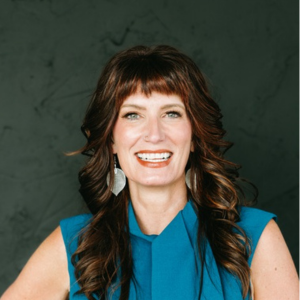
Anne Murphy is a public speaker, consultant, and serial entrepreneur building a movement of women in AI. She is founder of She Leads AI, co-founder of Moxxee, and CEO of Empowered Fundraiser Consulting, with 35 years in fundraising and more than $10 billion in campaigns. She has educated more than 4,000 women in responsible AI use and is co-author of the Framework for Responsible AI in Fundraising and co-host of The Daily AI Show.
These guides are produced by Anne with her agentic leadership team.